The control functions are used to create and handle controls.
Common control functions
Functions that can be used on different types of controls.
Sets the text of a control that supports it. |
||
Removes a control from a form. |
Label
The label is a simple control for showing text.
Creates a label to show text |
Button
The button can be clicked by the user to trigger events.
Creates a button. |
||
Handles a click on the button. |
Check Box
The check box can be used both to show the status of something, and for user input.
Creates a new check box |
||
Handles the event when the check box changes status. |
||
Sets if the check box is checked |
||
Determines if the check box is checked. |
Numeric Spinner
The numeric spinner is used for entering numeric values.
Creates a new spinner |
||
Retrieves the value of the spinner |
||
Sets the value of the spinner |
Text box 
The text box is used for entering text. Clicking the text box will show a dialog to change the value of the text box.
Creates a text box. |
||
Retrieves the text. |
Radio button 
The radio button is used for selecting between multiple choices.
Creates a radio button. |
||
Checks if the radio button is selected. |
||
Selects the radio button. |
Progress bar 
The progress bar is used for showing a process is progressing.
Creates a progress bar. |
||
Updates the value of the progress bar. |
List control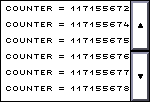
The list control can be used both for showing e.g. output from an ongoing process and for allowing the user to select between multiple choices.
Creates a list control. |
||
Set the value of a specific item. |
||
Appends an item to the end of the list, dropping the first item if the list is full. |
||
Retrieves the index of the selected item. |
||
Selects an item. |
Graph control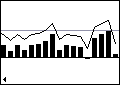
The graph control can be used for visualizing data.
Creates a new graph. |
||
Set the value of a bar in the bar graph. |
||
Set the value of a point on a line graph. |
||
Append the entries to the graph. |
||
Adds a horizontal marker to the graph. |